AI Background Removal for Product Photos: Complete 2026 Guide
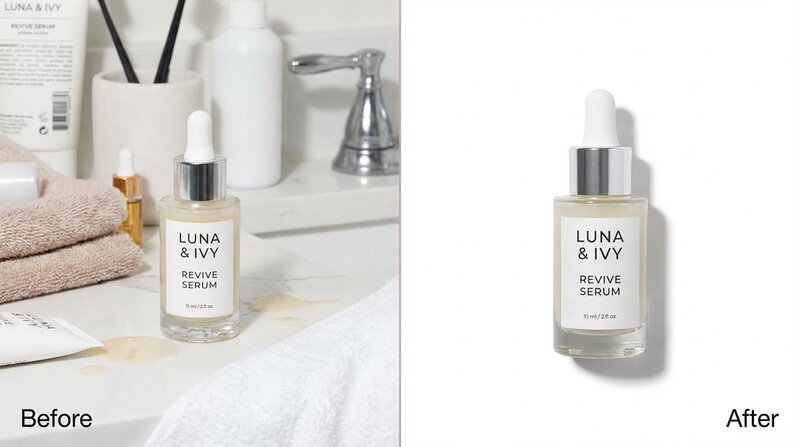
Clean backgrounds are the foundation of great product photography. AI removes them in under 2 seconds with pixel-perfect accuracy.
Why Background Removal Is Step One
Every great product image starts with isolation. Whether you're creating Amazon-compliant white backgrounds, lifestyle scenes, or social media content, the first step is always the same: separate the product from its background.
In the old days, this meant hours in Photoshop with the pen tool, carefully tracing every edge. Today, AI does it in under 2 seconds with better accuracy than most human editors.
How AI Background Removal Works
Modern AI models are trained on millions of images to understand the difference between foreground subjects and backgrounds. They analyse edges, transparency, shadows, and context to create precise cutouts.
The technology handles challenges that trip up simple tools:
- Hair and fur: AI preserves fine strands and wispy edges
- Transparent objects: Glass, water, and translucent materials are handled correctly
- Complex edges: Products with irregular shapes get clean, accurate outlines
- Shadows: Natural shadows can be preserved or removed based on your needs
Background Removal + AI Generation: The Power Combo
Background removal on its own gives you a product on a transparent background. That's useful for white backgrounds and basic compositing. But the real power comes when you combine it with AI scene generation.
The workflow: remove background → AI generates 10 different scenes around your product. Your kitchen knife goes from a messy countertop photo to a professional studio shot, a chef's kitchen lifestyle image, a flat-lay arrangement, and more - all from one source photo.
Platform-Specific Background Requirements
Amazon
Main images must have pure white backgrounds (RGB 255,255,255). The product must fill at least 85% of the frame. AI background removal creates compliant images automatically.
Etsy
Etsy is more flexible - lifestyle backgrounds often perform better than white. Use background removal as a starting point, then generate contextual scenes that match your brand's handmade aesthetic.
Shopify
Consistency matters most on your own store. Remove all backgrounds and generate new ones with matching style for a cohesive product catalogue.
Social Media
Background removal enables creative compositing. Place your product in trending visual contexts - seasonal themes, trending colour palettes, or lifestyle scenarios that resonate with your audience.
Free vs Paid Background Removal Tools
- Free tools (remove.bg, Canva): Good for occasional use. Quality is decent but may struggle with complex edges. Usually limited to basic PNG output.
- Integrated AI tools (ShopShot): Background removal is built into the generation pipeline. You don't just get a cutout - you get 10 complete product images with professionally generated backgrounds.
- Professional tools (Photoshop AI, Capture One): Best accuracy for complex products. Overkill for most e-commerce use cases.
Best Practices for Better Results
- Photograph products against a contrasting background (not the same colour as the product)
- Ensure good, even lighting - shadows help the AI understand 3D shape
- Avoid busy backgrounds that might confuse edge detection
- For transparent products (glass, bottles), photograph against a mid-grey background
- Keep the product in focus - blurry edges produce blurry cutouts
ShopShot includes a free standalone background removal tool at shopshot.co.uk/tools/remove-background. For full product photography with AI-generated scenes, try the main app free with 15 credits.
Frequently Asked Questions
How accurate is AI background removal?
Modern AI background removal achieves pixel-perfect accuracy in under 2 seconds, handling complex edges like hair, fur, and transparent objects. It matches or exceeds manual Photoshop editing for most products.
Is AI background removal free?
Many tools offer free background removal for basic use. ShopShot includes a free standalone tool at shopshot.co.uk/tools/remove-background. For full AI scene generation, subscription plans start at £9.99/month.
What background colour does Amazon require?
Amazon requires pure white backgrounds with RGB values of 255, 255, 255 for main product images. AI background removal tools can generate Amazon-compliant white backgrounds automatically.
Can AI remove backgrounds from transparent products?
Yes, advanced AI models handle transparent and translucent products like glass, bottles, and clear packaging. For best results, photograph transparent products against a mid-grey background.
Ready to Transform Your Product Photography?
Try ShopShot free and see professional AI photography in action.
Start Free - 15 Credits